# ABCEx
{% hint style="info" %}
For discussions about terms and connections, please contact a [service representative](https://t.me/ABCEX_API_support).
**Disclaimer**: When connecting your website to any service, please assess the potential risks of collaboration on your own.
{% endhint %}
{% hint style="success" %}
[General instructions for setting up trading parameters](https://premium.gitbook.io/main/osnovnye-nastroiki/modul-torgovye-deistviya/sozdanie-torgovogo-deistviya/parametry-torgovykh-deistvii)
{% endhint %}
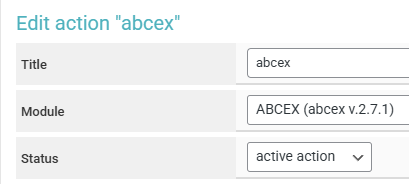
Go to the "**Trading Actions**" section ➔ "**Add Action**", enter a name for the trading action in the "**Title**" field, select ABCEx from the "**Module**" dropdown, keep the status as "**Active Action**," and click "**Save**."
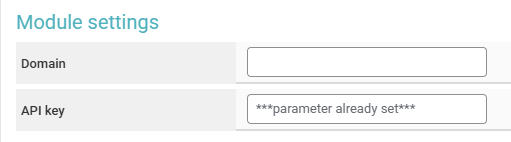
Enter your API key received from the exchange representative (leave the "**Domain**" field empty) and save the changes.
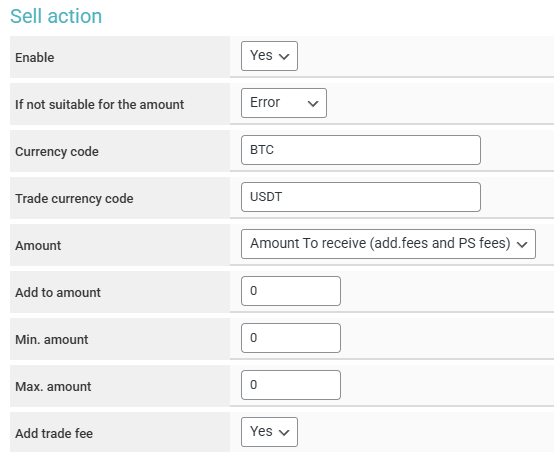
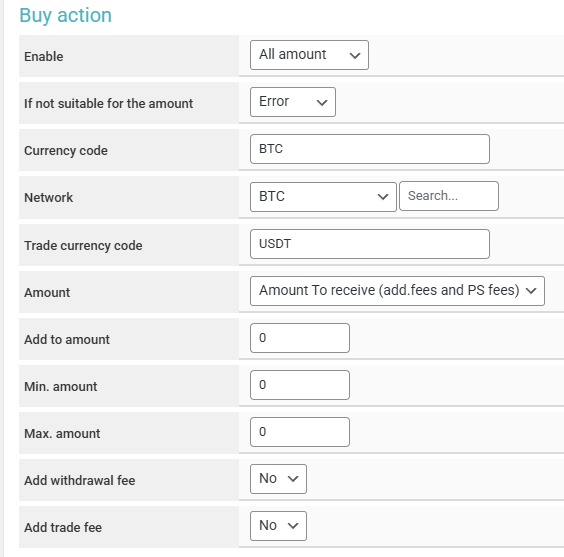
In the module, you can create one of two actions — "**Sell**" or "**Buy**."
{% hint style="info" %}
The "**Sell**" action is suitable when you want to convert the amount equivalent to the currency received from the client into a stablecoin like USDT (or another currency that you find appropriate).
The "**Buy**" action is suitable when you do not want to hold a reserve of the currency being paid out in your exchange accounts and plan to purchase the currency for payout only when a client has a request to buy that currency from your exchange. In this case, you need to use the [ABCEx auto payout module](https://premium.gitbook.io/main/osnovnye-nastroiki/merchanty-i-avtovyplaty/avtovyplaty/abcex) to pay out the currency immediately after its purchase.
Example: **Exchange direction BTC** — **USDT**.\
If you want to **sell** the equivalent amount received from the client on the exchange ABCEx (for example, sell BTC to receive USDT) — select the amount in the "**You Give**" field in the trading action settings for the "**Sell**" action (the "**Currency Code**" and "**Trading Currency Code**" fields should be empty, or in the "**Currency Code**" field (currency for sale) enter BTC, and in the "**Trading Currency Code**" field enter USDT).\
When the trading action is triggered on the ABCEx exchange, it will **sell** BTC from your balance and **buy** USDT at the market rate.
If you want to **buy** the equivalent amount sent to the client (for example, buy BTC by paying with USDT) — select the amount in the "**You Give**" field in the trading action settings for the "**Buy**" action (the "**Currency Code**" and "**Trading Currency Code**" fields should be empty, or in the "**Currency Code**" field (currency for purchase) enter BTC, select BTC in the "**Network**," and in the "**Trading Currency Code**" field enter USDT).\
When the trading action is triggered on the ABCEx exchange, it will **buy** BTC from your balance and **sell** USDT at the market rate.
{% endhint %}
{% hint style="success" %}
Examples of trading actions:
Example 1:\
Action "**Sell**", exchange direction **USDT TRC20 to BTC**, in the trading action settings the currencies for purchase ("**Currency Code**") are **USDT** and for sale ("**Trading Currency Code**") are **RUB**, amount from the request "**You Give**".\
A client creates a request to receive 0.0012 BTC (\~100 USDT) and pays for it. At this moment (if the trading action is set to execute "**After Merchant Confirmation Status**") on the exchange, there will be a **sale** of **USDT** for **RUB** for the amount of the request (provided there is sufficient balance to execute the action).\
\\
Example 2:\
Action "**Sell**", exchange direction **USDT TRC20 to BTC**, in the trading action settings the "**Currency Code**" and "**Trading Currency Code**" fields are empty for purchase and sale, amount "**You Give**".\
A client creates a request to receive 0.0012 BTC (\~100 USDT) and pays for it. At this moment, there will be a **purchase** of **BTC** for **USDT** for the amount of the request on the exchange.
\\
Example 3:\
Action "**Sell**", exchange direction **BTC to USDT TRC20**, in the trading action settings the currencies are set to "**Auto**" for purchase and sale, amount "**You Receive**".\
A client creates a request to receive 100 USDT and pays for it. At this moment, there will be a **purchase** of **BTC** for **USDT** for the amount of the request on the exchange.\
\
Example 4:\
Action "**Sell**", exchange direction **USDT TRC20 to RUB**, in the trading action settings the currencies are set to "**Auto**" for purchase and sale, amount "**You Receive**".\
A client creates a request to receive 8500 RUB (\~100 USDT) and pays for it. At this moment, there will be a **purchase** of **USDT** for **RUB** for the amount of the request on the exchange.
{% endhint %}
{% hint style="warning" %}
Please note that you can create actions for stepwise exchange of one currency to another through intermediate currencies. Most often, when there is no pair **currency 1** ➔ **currency 2** on the exchange, the exchange is done through the stablecoin USDT (TRC20) (**currency 1** ➔ **USDT** ➔ **currency 2**), but you can also use alternative options.
For stepwise exchange, you need to:
* create 2 trading actions: **Sell** (**currency 1** ➔ **USDT**) and **Buy** (**USDT** ➔ **currency 2**)
* select the same exchange directions and statuses for triggering in the "**Settings for Addition**" block in the trading action settings
* set the order of execution: 1 — for the **Sell** action, 2 — for the **Buy** action.
{% endhint %}
To ensure the correct execution of the trading action, it is also important to select a currency pair that is traded on the ABCEx exchange in the "**Currency Code**" and "**Trading Currency Code**" fields. If both fields are left empty, the currencies will be selected automatically (see examples above).
{% hint style="danger" %} **Currently, the available currency pairs are USDT/RUB and BTC/USDT (and their reverse pairs).**
If you select currencies that do not form a pair, the trading action will definitely encounter an error when attempting to execute.
{% endhint %}